Tampilkan postingan dengan label Android. Tampilkan semua postingan

Sabtu, 28 September 2013

Custom ROM Galaxy Wonder CyanogenMod 10.1 Jelly Bean 4.2.2

[ROM][JB][4.2.2][JDQ39E] CyanogenMod 10.1 ALPHA (Build 9)


What's working:
Audio
Receiving and making calls
GPS
Compass
Proximity sensor
Wifi
Bluetooth
USB mass storage
HW accelerated gui
HW accelerated video
Camera
Torch
Wifi/USB tethering
USB OTG
Vsync

Annoyances:
Green color when taking pictures (saved picture is ok though)


Download CM-10.1 and gapps-jb zips and put in /sdcard
  • 09-25: CM-10.1 alpha9 [DOWNLOAD]
    MD5SUM: 73A9F9C65A414463BA75C4D73167016C
    • CM Account
    • Synced with CM 10.1.3
    • Kernel 3.4.62
  • 08-13: CM-10.1 alpha8 [DOWNLOAD]
    MD5SUM: A55B60EADF32329B788EB6AE760BC813
    • Reverted patch causing battery drain (causes random white screen though)
    • Enable volume rocker and home button wake
    • Synced with CM (security fixes etc.)
    • Kernel 3.4.57
  • 2013-06-12: CM-10.1 alpha7 [DOWNLOAD]
    MD5SUM: 725DAAE6A58D16E040C64DE343D9E868
    • Disabled unsupported functions on front camera
    • Switched back to kernel 3.0 in order to get feedback on battery usage compared to 3.4 kernel
    • Kernel 3.0.81

WARNING: Many apps will Force Close crash if you restore data from a previous ROM.

Install
  1. Use CWM5 or CWM6.
    • Warning: Only use this recovery to flash CM-10.1. Otherwise, you risk bricking your phone!
  2. Wipe data and cache.
  3. Flash update*.zip.
  4. Flash gapps*.zip. You must flash gapps after every upgrade to CM10.1 since /system is formatted, wiping your previous add-ons.
  5. Reboot phone.
  6. After you setup your Google account, reinstall the three apps from Market in order to restore most of your apps, call log and SMS history.
  7. Warning: Do not restore backup data of system apps!
    • If you restore a bad backup with cached settings in telephony.db in data/data/com.*.*.telephony it can break MMS.
    • It seems that restoring backups can also break Calendar sync.


Sumber: http://forum.xda-developers.com/showthread.php?t=2214042

Sabtu, 21 September 2013

Custom ROM Jelly Bean 4.2.2 CyanogenMod 10 Final Release (EOL) Galaxy Wonder i8150


For general discussions, bug reports and FAQ, go here.

What's working:
Audio
Receiving and making calls
GPS
Compass
Proximity sensor
Wifi
Bluetooth
USB mass storage
HW accelerated gui
HW accelerated video
Camera
Torch
Wifi/USB tethering

Annoyances:
Artifacts in preview for panorama shots
Green color when taking pictures (saved picture is ok though)

Screenshots

Click image for larger version

Name:	Screenshot_2012-11-23-19-43-38[1].jpg
Views:	39001
Size:	14.5 KB
ID:	1505450 Click image for larger version

Name:	Screenshot_2012-11-14-01-43-34.jpg
Views:	106962
Size:	26.0 KB
ID:	1480317 Click image for larger version

Name:	Screenshot_2012-11-14-01-44-20.jpg
Views:	87251
Size:	18.2 KB
ID:	1480318 Click image for larger version

Name:	Screenshot_2012-11-14-01-44-44.jpg
Views:	86652
Size:	16.9 KB
ID:	1480319 Click image for larger version

Name:	Screenshot_2012-11-14-01-45-09.jpg
Views:	86607
Size:	31.9 KB
ID:	1480320


CM10 Install Guide


Note: CM for Galaxy W is provided with no warranty. You are installing this software at your own risk. You may be violating your warranty.

Download CM10 and gapps-jb zips and put in /sdcard
  • 2013-06-07: CM10 Final Release [DOWNLOAD]
    MD5SUM: 44BC093216E99ED5ED44F98BF8AC448A
    • Fixed issue with bluetooth not reconnecting to devices if it was on during reboot
    • Disabled unsupported functions on front camera
    • Reverted a bionic optimization that apparently causes issues on scorpion chips
    • Kernel 3.0.80
  • 2013-05-09: CM10 rc1 [DOWNLOAD]
    MD5SUM: afaa66dbb39eec68785248aada6a4135
    • Fixed "pop" sound on shutdown and entering PIN (credits CastagnaIT)
    • Added to build.prop option for switching SD cards (no need for changing vold.fstab anymore)
    • Synced with CM
    • Kernel 3.0.77
  • 2013-04-07: CM10 beta1 [DOWNLOAD]
    MD5SUM: 12A0387D6CBA6645C44EBAA1520C89C8
    • Updated CM logo in boot splash
    • Fixed lockscreen weather due to API changes from Yahoo
    • Enabled NTFS read support in kernel
    • Fixed WEP issue (credits to ivendor for finding this one)
  • 2013-03-17: CM10 alpha7 [DOWNLOAD] [MIRROR]
    MD5SUM: 528C36AA8C2BE027CF97380BA4497265
    • New wifi driver (note: WEP support is currently broken)
    • Enabled all focus modes in camera app
    • Support for PPPoE in kernel
    • Support for USB fast charging (needs 3rd party app to enable) (credits ivendor)
    • Support for OTG (needs external powered hub) (credits ivendor)
    • Many kernel changes and updates
  • 2013-02-17: CM10 alpha6 [DOWNLOAD]
    MD5SUM: 4AD824BCE0049B2044B8C947CC2A4399
    • Front camera is now working
    • Fixed issue with no pin unlock screen after reboot
    • Fixed issue with APN's gone missing after pin unlock (ivendor)
    • Fixed graphics glitch when rotating keyboard (bug in CM and not fixed upstream, so had to revert the offending patch)
    • Various other small rom and kernel fixes
  • 2013-02-11: CM10 alpha5 [DOWNLOAD]
    MD5SUM: 7A4809D3EA5AD316A59E5ADFE86F3E96
    • 3.0 kernel only
    • Back camera working (front camera disabled because of issues)
    • Workaround for missing apn's when using pin lock
    • Some other small changes
  • 2013-01-26: CM10 alpha4.1 [DL 2.6 KERNEL VERSION] [DL 3.0 KERNEL VERSION]
    MD5SUM 2.6 kernel version: c984cc327f815beb5909012798ee4c89
    MD5SUM 3.0 kernel version: 0fa9986ecebca56624197f2a20568cc1
    • Rereleased with fixed 3.0 kernel version
  • 2013-01-22: CM10 alpha4 [DL 2.6 KERNEL VERSION] [DL 3.0 KERNEL VERSION]
    MD5SUM 2.6 kernel version: 09C8631323556C2208A44256714FB647
    MD5SUM 3.0 kernel version: 5E0DCB417087110BDC7F52CB2F7A2404
    • Fixed data usage in 3.0 kernel version
    • Enabled WEBGL
    • Updated media_profiles
    • Various kernel updates (see github)
    • Synced with CM
  • 2012-12-10: CM10 alpha3 [DL 2.6 KERNEL VERSION] [DL 3.0 KERNEL VERSION]
    MD5SUM 2.6 kernel version: 70A61B0DC42E01BCD03DE60221C0408B
    MD5SUM 3.0 kernel version: D15E41D473039EB9562558B7ED93FBA9
    • Fixed HSDPA issues (see Annoyances above though regarding APN)
    • Updates to the display system
    • Building liblights from source
    • Synced with CM
  • 2012-11-20: CM10 alpha2 [DOWNLOAD] [MIRROR]
    MD5SUM: D258C97FA8C8AF2A7029E02475F2AA00
    • Fixed wifi tethering
    • Fixed USB tethering
    • Fixed torch in power widget
    • Switched from legacy to native camera
  • 2012-11-14: CM10 alpha1 [DOWNLOAD]
    MD5SUM: DE4E29478599F60A5581B818051EB771
    • Initial release
Before you install CM10: Preparation (First three are optional. If you want to start fresh, these can be skipped)
  1. Install AppBak from Market, run it and save a list of all your apps.
  2. Install SMS Backup and Restore from Market, run it and backup your SMS history.
  3. Install Call Logs Backup and Restore from Market, run it and backup your call log history.
  4. Boot into CWM5 recovery. Make a full backup. You will need this backup later if you decide to go back to your previous ROM and data.
WARNING: Many apps will Force Close crash if you restore data from a previous ROM.

Install
  1. Use CWM5 or CWM6.
    • Warning: Only use this recovery to flash CM10. Otherwise, you risk bricking your phone!
  2. Wipe data and cache.
  3. Flash update*.zip.
  4. Flash gapps*.zip. You must flash gapps after every upgrade to CM10 since /system is formatted, wiping your previous add-ons.
  5. Reboot phone.
  6. After you setup your Google account, reinstall the three apps from Market in order to restore most of your apps, call log and SMS history.
  7. Warning: Do not restore backup data of system apps!
    • If you restore a bad backup with cached settings in telephony.db in data/data/com.*.*.telephony it can break MMS.
    • It seems that restoring backups can also break Calendar sync.
Upgrades
Upgrades from previous versions of CM10 are the same process as install, except you do not need to wipe anything. Contrary to popular belief, you do not need to even wipe cache and dalvik-cache when upgrading between CM10 versions. You only need to wipe if you are doing a major upgrade, switching to a different ROM entirely, or attempting to fix bugs caused by bad backups or corrupt app data.

Credits
CyanogenMod Team
Epic Touch CM Team for the install instructions
ivendor and mirred for help with the camera HAL
THE-E for download mirror
Everyone that donated beers 

Sumber: http://forum.xda-developers.com/showthread.php?t=1990795

Touchwiz 5 ROM For Galaxy W Jelly Bean 4.2.2

Touchwiz 5 Jelly Bean 4.2.2
Based on CM10.1 Alpha 7 

Screenshots:


Features on Touchwi5 JB 4.2.2
Build for daily use
Based on CM10.1 Alpha 6
S4 Themed
S3 launcher
S4 Status bar with white clock and date
S4 UI sounds and ringtones
S4 weather widget
S4 Calculator
S4 clock (Digital, funky, modern)
S4 Messaging app
S4 Wallpaper chooser
Touchwiz like keyboard
S memo from S4
Walkman Player
Samsung task manager
Themed system apps
Transparent Playstore 4.0.27
Super light gapps included
Madridii's Kernel
W-handle for lockscreen long version
Samsung JB bootanimation
OTG support
Seeder V7
Build.prop tweaks
Removed many apps
Rooted
Working
Audio
Receiving and making calls
GPS
Compass
Proximity sensor
Wifi
Bluetooth
USB mass storage
HW accelerated gui
HW accelerated video
Camera
Torch
Wifi/USB tethering
USB OTG
Vsync
Annoyances
Artifacts in preview for panorama shots
Green color when taking pictures (saved picture is ok though)
Thanks - Credits
To arco68 for his CM10.1
To Madridii for his kernel
To Adi Aisiteru Reborn for everything
To ryuinferno for the seeder v7
To blackcat67 for the universal s4 theme
To Yeti12 for the amazing bootanimation
To LeroViten for the poweramp fix
To Team REMICS-JB for the amazing apps
To GalaxyW Indo for supporting me
To ::indie:: for idea to the thread
 
Touchwi5 v8:
Fixed SystemUI force stop when hold menu button (app switcher)
Switched back to hurtsky kernel 3.4 v2.5 as people complaining that seeder is not working
Added ''touchwiz like keyboard'' (credits team REMICS_JB)
Touchwi5 v7:
Rebuild the whole ROM and odexed (All problems have been solved)
Reverted to S3 launcher (to prerevent force close with the AccuWidget
Fixed theme
Added Accuweather Widget
Added S4 Planner (Calender)
Added S4 Calculator
Added S4 Clock (Digital, Funky, Modern)
Added S4 Wallpaper Chooser
Updated S Memo to S4 version
Updated Samsung Task Manager to S4 version
Updated system fonts to S4 style
Touchwi5 v6:
Added madriddi lastest kernel for longer battery life
Fixed poweramp cannot be install issue (Thanks @LeroViten)
Fixed Playstore
Added Samsung music player
Removed apollo
Touchwi5 v5:
Update base CM10.1 Alpha 7
Added hurtsky's kernel v2.3
Removed transparent statusbar due to some problem
Fixed launcher force close
Removed Accuweather Widget
Changed holo dark background to CM style for better appearance
Touchwi5 v4:
Update base CM10.1 Alpha 6
The transparent status bar is now included on the rom (A big big thanks to Adi Aisiteru Reborn, He made this possible)
Added hurtsky kernel v2.2 moremem
Removed googlebackuptransport
Touchwi5 v3:
Update base CM10.1 Alpha 5
Fixed bluetooth
Fixed force close on some apps that rely on GPS
Added Skull kernel v1.2
Fixed Setting FC on changing tiles and layout
Removed seeder because of some battery problem
Touchwi5 v2:
Added arco's kernel 3.4.43
Addon for Statusbar
Revert to CM10.1 Keyboard
Fixed unknown ringtone on first boot
Raised Lock/Unlock sound
Touchwi5 v1:
Initial release

Downloads

Gapps included, Do not flash gapps!
Build 8 [1]
Build 7 [1]
Build 6 [1]
Build 5 [1]
Build 4 [1]
Build 3 [1] [2]
Build 2 [1] [2]
Build 1 [1] [2]
 Installation:
Please make sure you have clockworkmod or twrp installed. If not, please refer to this thread
Boot to CWM Recovery by holding volume up, power button and home key
Make a nandroid backup and make sure to keep a copy of the backup to your pc
Wipe data / factory reset (Not needed if you update from Touchwi5)
Install Touchwi5
(Wipe cache will be done automatically during installation so you can skip this step
Wipe dalvik cache will be done automatically during installation so you can skip this step)
Guidance for flashing Touchwi5 ROMS:
Full Wipe Install (recommended)
- Wipe Data / Factory Reset
- Wipe Cache and Dalvik Cache
- Format System partition
- Install

No Wipe Install
- Wipe Cache and Dalvik Cache
- Install
Sumber:http://forum.xda-developers.com/showthread.php?t=2259071

Jumat, 21 Juni 2013

[ROM][JB][4.2.2] CyanogenMod 10.1 ALPHA (Build 7)


What's working:
Audio
Receiving and making calls
GPS
Compass
Proximity sensor
Wifi
Bluetooth
USB mass storage
HW accelerated gui
HW accelerated video
Camera
Torch
Wifi/USB tethering
USB OTG
Vsync

Annoyances:
Green color when taking pictures (saved picture is ok though)

Screenshots

Click image for larger version

Name: Screenshot_2013-03-30-18-48-30[1].jpg
Views: 27797
Size: 15.9 KB
ID: 1846235 Click image for larger version

Name: Screenshot_2013-03-30-18-40-29[1].jpg
Views: 29056
Size: 21.9 KB
ID: 1846236 Click image for larger version

Name: Screenshot_2013-03-30-18-37-07[1].jpg
Views: 31541
Size: 17.6 KB
ID: 1846237 Click image for larger version

Name: Screenshot_2013-03-30-18-36-08[1].jpg
Views: 31655
Size: 25.6 KB
ID: 1846238

CM-10.1 Install Guide

Note: CM for Galaxy W is provided with no warranty. You are installing this software at your own risk. You may be violating your warranty.

Download CM-10.1 and gapps-jb zips and put in /sdcard
  • 2013-06-12: CM-10.1 alpha7 [DOWNLOAD]
    MD5SUM: 725DAAE6A58D16E040C64DE343D9E868
    • Disabled unsupported functions on front camera
    • Switched back to kernel 3.0 in order to get feedback on battery usage compared to 3.4 kernel
    • Kernel 3.0.81
  • 2013-05-28: CM-10.1 alpha6 [DOWNLOAD]
    MD5SUM: a6aab9ad73a5a8e27487a4e78764806f
    • Fixed WEP connection
    • Fixed bluetooth MAC address during boot
    • Kernel 3.4.47
  • 2013-05-12: CM-10.1 alpha5 [DOWNLOAD]
    MD5SUM: 369C24C1441F2FEC5ACC821B89A2D20D
    • Fixed wifi tethering
    • Fixed bluetooth file transfer issue
    • Fixed "pop" sound on shutdown and entering PIN (credits CastagnaIT)
    • Kernel 3.4.44
Before you install CM-10.1: Preparation (First three are optional. If you want to start fresh, these can be skipped)
  1. Install AppBak from Market, run it and save a list of all your apps.
  2. Install SMS Backup and Restore from Market, run it and backup your SMS history.
  3. Install Call Logs Backup and Restore from Market, run it and backup your call log history.
  4. Boot into CWM5 recovery. Make a full backup. You will need this backup later if you decide to go back to your previous ROM and data.
WARNING: Many apps will Force Close crash if you restore data from a previous ROM.

Install
  1. Use CWM5 or CWM6.
    • Warning: Only use this recovery to flash CM-10.1. Otherwise, you risk bricking your phone!
  2. Wipe data and cache.
  3. Flash update*.zip.
  4. Flash gapps*.zip. You must flash gapps after every upgrade to CM10.1 since /system is formatted, wiping your previous add-ons.
  5. Reboot phone.
  6. After you setup your Google account, reinstall the three apps from Market in order to restore most of your apps, call log and SMS history.
  7. Warning: Do not restore backup data of system apps!
    • If you restore a bad backup with cached settings in telephony.db in data/data/com.*.*.telephony it can break MMS.
    • It seems that restoring backups can also break Calendar sync.
Upgrades
Upgrades from previous versions of CM10.1 are the same process as install, except you do not need to wipe anything. Contrary to popular belief, you do not need to even wipe cache and dalvik-cache when upgrading between CM10.1 versions. You only need to wipe if you are doing a major upgrade, switching to a different ROM entirely, or attempting to fix bugs caused by bad backups or corrupt app data.

Senin, 04 Maret 2013

CyanogenMod 10 ALPHA (Build 6) Galaxy W


Yang bekerja:
Audio
Receiving and making calls
GPS
Compass
Proximity sensor
Wifi
Bluetooth
USB mass storage
HW accelerated gui
HW accelerated video
Camera
Torch
Wifi/USB tethering

Masih gangguan:
Artifacts in preview for panorama shots
Green color when taking pictures (saved picture is ok though)

Screenshots

Click image for larger version

Name: Screenshot_2012-11-23-19-43-38[1].jpg
Views: 16184
Size: 14.5 KB
ID: 1505450 Click image for larger version

Name: Screenshot_2012-11-14-01-43-34.jpg
Views: 54685
Size: 26.0 KB
ID: 1480317 Click image for larger version

Name: Screenshot_2012-11-14-01-44-20.jpg
Views: 48043
Size: 18.2 KB
ID: 1480318 Click image for larger version

Name: Screenshot_2012-11-14-01-44-44.jpg
Views: 47512
Size: 16.9 KB
ID: 1480319 Click image for larger version

Name: Screenshot_2012-11-14-01-45-09.jpg
Views: 47533
Size: 31.9 KB
ID: 1480320


CM10 Cara Install


Download CM10 and gapps-jb zips dan taruh di /sdcard
  • 2013-02-17: CM10 alpha6 [DOWNLOAD]
    MD5SUM: 4AD824BCE0049B2044B8C947CC2A4399
    • Kamera depan sudah bekerja.
    • Fixed issue with no pin unlock screen after reboot
    • Fixed issue with APN's gone missing after pin unlock (ivendor)
    • Fixed graphics glitch when rotating keyboard (bug in CM and not fixed upstream, so had to revert the offending patch)
    • Various other small rom and kernel fixes
  • 2013-02-11: CM10 alpha5 [DOWNLOAD]
    MD5SUM: 7A4809D3EA5AD316A59E5ADFE86F3E96
    • 3.0 kernel only
    • Back camera working (front camera disabled because of issues)
    • Workaround for missing apn's when using pin lock
    • Some other small changes
  • 2013-01-26: CM10 alpha4.1 [DL 2.6 KERNEL VERSION] [DL 3.0 KERNEL VERSION]
    MD5SUM 2.6 kernel version: c984cc327f815beb5909012798ee4c89
    MD5SUM 3.0 kernel version: 0fa9986ecebca56624197f2a20568cc1
    • Rereleased with fixed 3.0 kernel version
  • 2013-01-22: CM10 alpha4 [DL 2.6 KERNEL VERSION] [DL 3.0 KERNEL VERSION]
    MD5SUM 2.6 kernel version: 09C8631323556C2208A44256714FB647
    MD5SUM 3.0 kernel version: 5E0DCB417087110BDC7F52CB2F7A2404
    • Fixed data usage in 3.0 kernel version
    • Enabled WEBGL
    • Updated media_profiles
    • Various kernel updates (see github)
    • Synced with CM
  • 2012-12-10: CM10 alpha3 [DL 2.6 KERNEL VERSION] [DL 3.0 KERNEL VERSION]
    MD5SUM 2.6 kernel version: 70A61B0DC42E01BCD03DE60221C0408B
    MD5SUM 3.0 kernel version: D15E41D473039EB9562558B7ED93FBA9
    • Fixed HSDPA issues (see Annoyances above though regarding APN)
    • Updates to the display system
    • Building liblights from source
    • Synced with CM
  • 2012-11-20: CM10 alpha2 [DOWNLOAD] [MIRROR]
    MD5SUM: D258C97FA8C8AF2A7029E02475F2AA00
    • Fixed wifi tethering
    • Fixed USB tethering
    • Fixed torch in power widget
    • Switched from legacy to native camera
  • 2012-11-14: CM10 alpha1 [DOWNLOAD]
    MD5SUM: DE4E29478599F60A5581B818051EB771
    • Initial release
Before you install CM10: Preparation (First three are optional. If you want to start fresh, these can be skipped)
  1. Install AppBak from Market, run it and save a list of all your apps.
  2. Install SMS Backup and Restore from Market, run it and backup your SMS history.
  3. Install Call Logs Backup and Restore from Market, run it and backup your call log history.
  4. Boot into CWM5 recovery. Make a full backup. You will need this backup later if you decide to go back to your previous ROM and data.
WARNING: Many apps will Force Close crash if you restore data from a previous ROM.

Install
  1. Use CWM5 or CWM6.
    • Warning: Only use this recovery to flash CM10. Otherwise, you risk bricking your phone!
  2. Wipe data and cache.
  3. Flash update*.zip.
  4. Flash gapps*.zip. You must flash gapps after every upgrade to CM10 since /system is formatted, wiping your previous add-ons.
  5. Reboot phone.
  6. After you setup your Google account, reinstall the three apps from Market in order to restore most of your apps, call log and SMS history.
  7. Warning: Jangan mengembalikan backup data of system apps!
    • If you restore a bad backup with cached settings in telephony.db in data/data/com.*.*.telephony it can break MMS.
    • It seems that restoring backups can also break Calendar sync.

Credits
CyanogenMod Team
Epic Touch CM Team for the install instructions
ivendor and mirred for help with the camera HAL
THE-E for download mirror
Everyone that donated beers 

Jumat, 30 November 2012

Android Jelly Bean (4.1)

Android Jelly BeanAndroid Jelly Bean adalah versi OS Android terbaru yang lebih menfokuskan diri ke user interface yang lebih cepat, lancar dan tidak lagg.
Namun Jelly Bean tidak hanya menawarkan user interface yang lebih cepat saja, karena hadir juga beberapa fitur lain yang bisa dibilang cukup baik. (selengkapnya dibahas pada bagian akhir artikel)
Contohnya adalah kehadiran Google Now yang dapat memberikan saran ke user berdasarkan data-data yang tersimpan didalam hp Android seperti kalender, kontak, info lokasi, dan juga search history.
Dengan Google Now; misalkan user memiliki janji meeting yang tercatat di kalender maka Google Now akan membantu user untuk menuju ke tempat tersebut dengan memberikan saran kendaraan yang digunakan, peta lokasi, beserta estimasi waktu sampai ditujuan.

Highlight fitur Android Jelly Bean 4.1

Android Jelly Bean1. User Interface yang smooth. Android Jelly Bean menjanjikan User Interface yang lebih cepat, smooth, dan responsif dengan hadirnya fitur triple buffering di graphics pipeline dan CPU input boost. Selain itu pengaturan V-Sync timing yang diset ke 16 millisecond akan membuat semua tampilan animasi, display refresh, touch event dan juga rendering applikasi memiliki kecepatan konstan & tidak akan ada lagg (delay).
2. Support Bi-Directional Text (penulisan dari kanan-ke-kiri atau kiri-ke-kanan), tambahan input keyboard (27 bahasa), Support Vertical text, custom keyboard maps, dll.
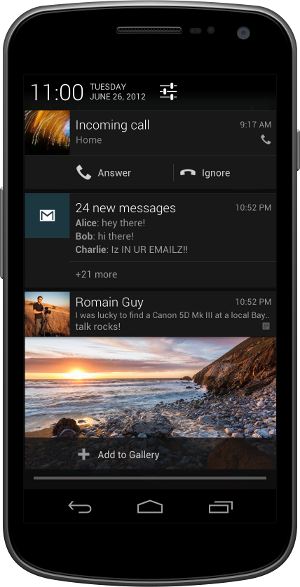
3. Expandable notifications. Notifikasi di layar home Android 4.1 akan tampil lebih besar dan dapat memuat media seperti foto, men-setting prioritas notifikasi, dan juga disable notifikasi dari applikasi yang tidak diinginkan.
Selain itu user juga dapat melakukan respon / tindakan langsung dari notifikasi yang telah diterima (misal menelepon / email orang yang telah menelepon).
4. Resizable app widgets. App Widgets dapat secara otomatis menyesuaikan ukurannya berdasarkan cara user menaruh widget di homescreen, orientasi layar, dan juga besarnya ruang homescreen yang tersedia.
5. Android Beam. Di Android 4.1, user akan akan semakin mudah men-share gambar, video, dll dengan kerjasama antara fitur NFC & Bluetooth.
6. New API. Kehadiran API baru seperti Wi-Fi Direct service discoverability, Network bandwidth management, dll.

Android Ice Cream Sandwich ( ICS )

Android Ice Cream Sandwich adalah update terbaru Sistem Operasi yang sedang naik daun saat ini, Android. Android ICS atau Android 4.0 memiliki banyak kelebihan yang membuatnya layak menjadi pesaing serius Blackberry  dan Apple. Menarik untuk membicarakan kelebihan dari Android Ice Cream Sandwich ini. Mari kita ulas :

Kelebihan Android Ice Cream Sandwich

Android Ice Cream Sandwich

Widget di Homescreen keren
pada Android Ice Cream Sandwich, widget yang ada di homescreen bisa disesuaikan besarnya (resizeable) sesuai dengan keinginan. Selain menyediakan widget yang bisa dikecil-besarkan ukurannya, Android Ice Cream Sandwich juga memberikan fitur membuat new folder dan kustomisasi action bar.
Terdapat Recent Apps
Dengan fitur ini, kita dengan mudah mengetahui aplikasi apa yang terakhir kita buka dan bisa multi tasking dalam membuka apps. Tampilan recent apps ini terlihat seperti yang digunakan di Honeycomb.
Face Unlock
Android Ice Cream Sandwich memiliki fitur yang sangat menarik, yaitu face unlock. Smartphone yang berjalan di OS ini ( contohnya Galaxy ) bisa mengenali wajah Anda dan bisa membuka kunci ponsel dengan identifikasi wajah. Wow, keren bukan?
Font Lebih Keren
Font baru yang diadaptasi OS Android terbaru ini tampak lebih keren karena bentuk hurufnya yang bulat-bulat dan sesuai dengan kualitas HD pada layar Nexus. Meski cuma sekadar font baru, perbedaannya terasa lebih nyaman di mata.
Berfoto Ria Lebih Mudah + Edit Langsung
Untuk mengaktifkan fungsi kamera, tidak perlu membuka kunci ponsel, cukup pakai tombol kamera bisa langsung berfoto ria. Fitur edit bisa langsung dipakai sebelum foto disimpan maupun di share lewat sosial media.
Terintegrasi dengan Google+
Selain itu, Ice Cream Sandwich dilengkapi dengan Google+, jejaring sosial yang di gembar-gemborkan bakal menjadi pesaing serius Facebook. Canggihnya, Anda bisa melakukan telekonferensi hingga dengan sepuluh orang dengan fitur Hangout di Google+.
Video multifungsi
Saat merekam video, kamu juga bisa mengambil foto dengan Ice Cream Sandwich ini. Saat diputar ulang, video Ice Cream Sandwich menyediakan fitur slow motion atau fast motion.

Android Gingerbread 2.3


Kepopuleran OS Android Gingerbread 2.3 dibanding versi lainnya nampaknya masih terus berlanjut. Dalam survei terbaru, terdapat 64 persen pengguna perangkat Android memakai OS Android Gingerbread 2.3.


Dibandingkan dengan survei sebelumnya, jumlah pengguna OS Gingerbread memang mengalami penurunan. Namun, penurunan yang terjadi tidaklah signifikan. Pada bulan lalu, jumlah pengguna OS yang berumur 18 bulan tersebut adalah 65 persen. Tidak terlalu besar bukan?
Dilihat dari jumlah prosentasenya, nampaknya kejayaan OS Android Gingerbread 2.3 ini masih akan terus berlanjut cukup lama. Padahal, OS Android Ice Cream Sandwich 4.0 sudah cukup lama beredar di pasaran. Dan, hasilnya saat ini sistem operasi yang bisa dipakai pada tablet dan handphone tersebut hanya digunakan 10.9 persen dari total pengguna perangkat Android. Angka ini merupakan rekor terbaru yang dimiliki oleh Android Ice Cream Sandwich. Angka tersebut merupakan penanda pencapaian mereka di kisaran angka 10 persen.
Peningkatan tersebut bisa dipengaruhi oleh berbagai faktor. Faktor yang pertama adalah mulai banyaknya produk handphone yang menggunakan OS Android Ice Cream Sandwich 4.0. Sedangkan faktor yang kedua, saat ini para produsen handphone Android sudah banyak memberikan update OS Android Ice Cream Sandwich kepada para konsumennya.
Lalu bagaimana dengan nasib OS Android Jelly Bean 4.1 di masa mendatang? Jika menilik dari sejarah yang telah terjadi, nampaknya kejadian serupa akan terus berulang. Bahkan, banyak pihak yang memperkirakan bahwa tahun 2012 ini masih merupakan tahun dari OS Android Gingerbread. Jadi, untuk beberapa bulan mendatang, jangan terlalu berharap OS Android Jelly Bean 4.1 bakal langsung menjadi OS Android terpopuler.

Android Froyo


Sistem operasi ini akan menjadi tren sebentar lagi di Indonesia, menurut prediksi saya. Google Android merupakan sistem operasi terbuka buatan Google Corp, berbasis Unix dan memiliki interface dan dukungan fitur yang canggih membuat Android dapat menjadi saingan OS Mobile yang lain seperti windows mobile atau OSX iPhone.
Froyo merupakan kode nama untuk versi Android ke 2.2 diambil dari nama makanan pencuci perut, dapat dilihat di gambar yang saya upload. Terdapat beberapa fitur dan perubahan dari versi sebelumnya yaitu Eclair.
Perubahan pada tampilan
Pada froyo terdapat perubahan pada tampilan, kalau saya bandingkan dengan Eclair di gadget saya, tampilan di Froyo lebih smooth, lalu terdapat widget baru di homescreen. Terdapat icon tlp dan internet di sekitar icon menu. Beberapa icon yang lebih smooth, begitu juga navigasi di interface dengan touch yang lebih manis jika dibandingkan dengan sebelumnya.

What Is Froyo?

Mendukung usb dan bisa menjadi portable hotspot

Denger-dengar mendukung fitur yang menjadikan gedget anda menjadi portable hotspot, mirip seperti windows mobile 6.5

What Is Froyo?

Pemprosesan lebih cepat dibanding Eclair

Kabar gembira dengan menggunakan Froyo, akan terjadi perubahan performa lebih cepat sampai 5x dibandingkan dengan Eclair.

What Is Froyo?

Sudah mendukung Flash 10.1

Jika Flash di tolak cintanya oleh Apple, tidak begitu pada Google, pada Android 2.2 ini sudah mendukung Flash 10.1, ini sangat penting karena Flash 10.1 sudah dioptimasi untuk berjalan di mobile device dibandingkan dengan seri sebelumnya. 

Update Aplikasi dan Musik langsung via OTA

Tidak perlu bingung mencari aplikasi baru ataupun musik-musik baru, cukup cari di Android Gadget bersistem Froyo, langgung download. Kebanyakan aplikasinya gratis-gratis 

What Is Froyo?
Selain itu bisa langsung stream (non DRM) iTunes library secara wireless dengan menggunakan Froyo. Dan masih banyak perubahan fitur-fitur baru dari berbagai aplikasi, seperti mendukung compass hardware untuk mengakses browse, bisa mengakses camera di dalam browser, berbagai web aplikasi sudah kaya aplikasi biasa di dalam froyo, jadi bingung mana yang aplikasi web atau aplikasi biasa (native application). Silakan tunggu kehadirannya, bagi para pengguna Nexus One akan diberikan updatenya ke seri Froyo.

Share

Twitter Delicious Facebook Digg